Eaglercraft Redstone Guide: Build and Fix Circuits
Build a small redstone circuit in a disposable Creative world, understand how signals travel, and troubleshoot the failures that are easy to mistake for browser lag.

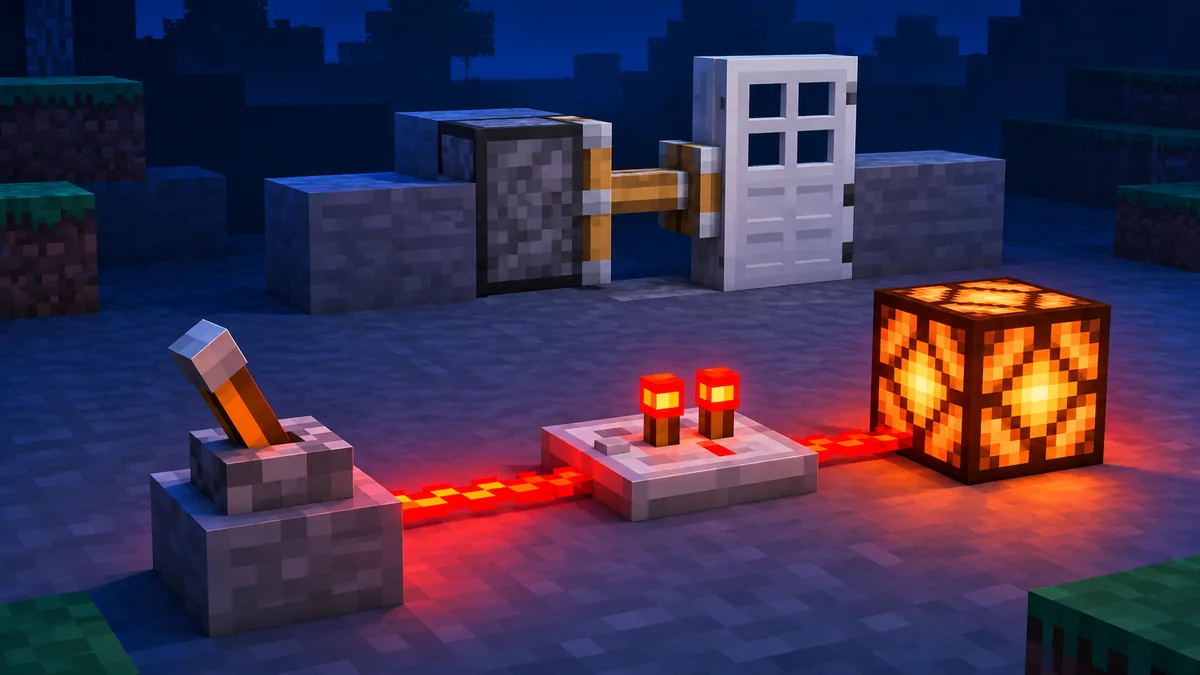
Table of Contents
What Eaglercraft Redstone Can Do
Eaglercraft redstone follows the familiar 1.8-era idea of a powered signal moving through blocks and activating a target. You can use levers, buttons, pressure plates, redstone torches, dust, repeaters, pistons, doors, lamps, dispensers, and note blocks to make a simple machine. The browser client does not turn redstone into a separate feature; it reproduces a Minecraft-style sandbox inside a web page, so a compact test is the most reliable way to learn what a particular build supports.
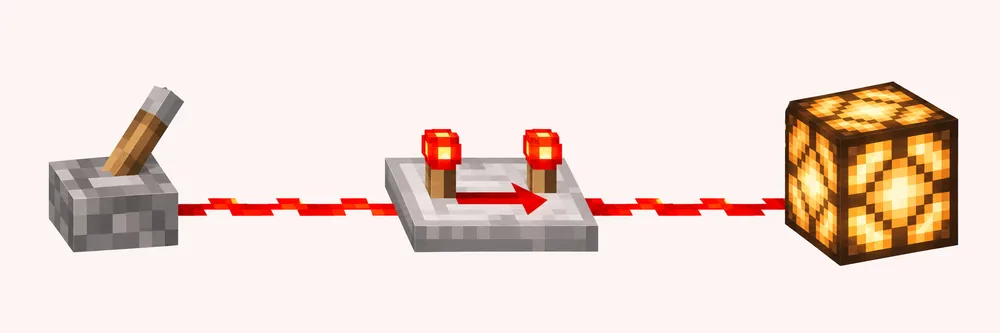
The best first project is deliberately boring: place a lever, run a short line of dust, and connect it to a redstone lamp. This gives you a visible output and lets you confirm that the world is receiving clicks, the blocks are placed in the expected direction, and the client is not still compiling or stuttering. Once that line works, add one component at a time. A door, piston, lock, or clock is much easier to debug when you know the original signal worked.
This page focuses on building and diagnosing circuits in a singleplayer or Creative test world. It is separate from the command guide, where permissions decide whether a slash command runs, and from the server guide, where a WSS connection and server software decide what players can do. A public server may disable, extend, or replace vanilla behavior. Treat the examples here as a controlled starting point, then verify them on the exact world or server where you want to use them.
If you only want a list of controls, use the main Minecraft 1.8.8 guide. If a map import is the real problem, use the maps guide first. Redstone troubleshooting begins after the world opens and the blocks can be placed normally.
Build the smallest visible circuit first. A working lamp is a better diagnostic baseline than a large door or elevator copied from an unverified video.
Redstone Components and Signal Rules in Eaglercraft
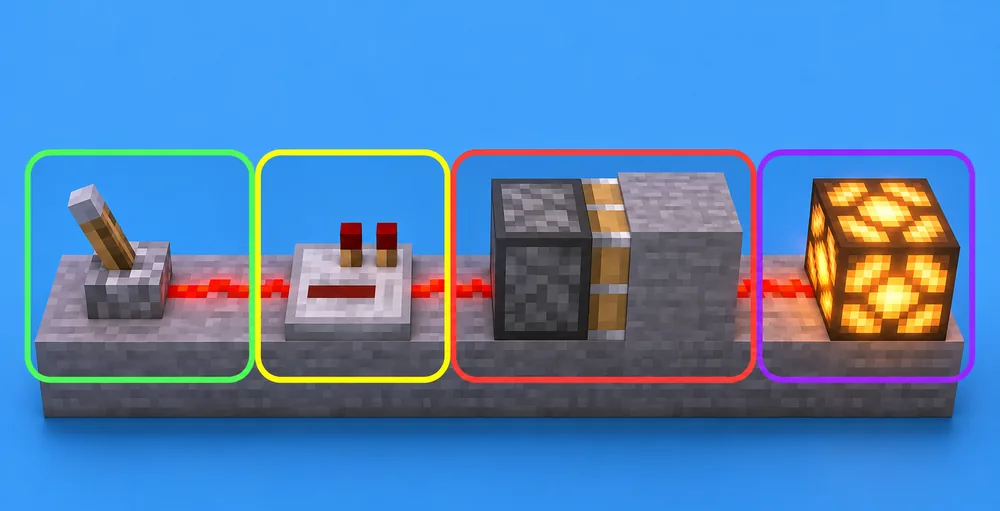
A redstone circuit has three jobs: create a signal, carry it, and produce an output. A lever, button, pressure plate, or redstone torch creates or changes power. Redstone dust carries the signal across a surface. A lamp, piston, door, dispenser, or note block shows that the signal arrived. When a build fails, name those three jobs separately instead of calling the whole circuit broken.
Dust is directional in practice even when the texture looks like a simple line. It connects to neighboring redstone components and can turn a corner, but a line that does not visibly connect will not carry power. Place dust on the same level while learning. A raised block, slab, stair, or transparent block can change the path, and a signal that appears close may still be one block too high or too low.
Repeaters are useful for two different reasons. They restore a signal after a limited run and add delay. The arrow on a repeater shows the direction of travel, so rotating one the wrong way can make a perfect-looking line appear dead. A repeater can also isolate a line from a return path, which helps when a door or clock feeds power back into itself.
Redstone torches invert the logic: a torch is normally lit until the block or line beneath it is powered. That makes torches useful for a simple NOT gate, an automatic door, or a lock indicator, but it also creates a common beginner mistake. If the supporting block is powered, the torch may turn off even though the nearby dust is correct.
Pistons need a powered face and a clear space for the block they push. Check the wooden face, not only the redstone dust behind it. A sticky piston also needs a compatible block to pull. In a browser client, lag can make a piston movement look late, but it cannot fix a wrong orientation or a blocked space. Test the piston alone before connecting it to a clock.
| Role | Examples | First check |
|---|---|---|
| Signal source | Lever, button, pressure plate, torch | Does the source visibly change when clicked or stepped on? |
| Signal path | Dust, repeater, powered block | Do the textures connect on the same level and point in the right direction? |
| Output | Lamp, piston, door, dispenser | Does the output have room and a powered face? |
| Timing | Repeater delay, torch loop, observer-style test | Does the circuit still work when one delay component is removed? |
| Environment | Loaded chunk, server rule, browser frame rate | Does the same circuit work in a fresh local Creative world? |
Build a First Working Eaglercraft Redstone Circuit
Create a new flat or empty Creative world for the first test. Keep the area small and place the whole circuit where you can see it from one standing position. This removes survival resource limits, prevents an old build from hiding a wiring mistake, and makes it easy to rebuild the line. Do not begin with a multiplayer server, a downloaded map, or a large tutorial machine; those add version, permissions, storage, and network variables before you have a baseline.
Start with a lever on a solid block. Place a short row of redstone dust on the same level, then place a redstone lamp at the end. Flip the lever. If the lamp lights, walk the line and check that each dust segment is connected. If it does not, replace the last dust and lamp rather than changing five blocks at once. This simple reset is faster than guessing which placement failed.
For a door or lock example, replace the lamp with an iron door and put a repeater before the door. The repeater arrow should face the door. Add a second lever on a separate test line if you want an inside and outside switch; do not join both lines until each switch works alone. A torch-based lock can be added later, but a direct lever circuit makes the first failure obvious.
When a piston is the output, place it facing the block you want to move and leave a clear space in front of it. Power the piston with a short dust line or a repeater. Toggle the source several times while standing nearby. If it moves only after a delay, compare that delay with browser frame rate before changing the wiring. A slow animation is different from a signal that never reaches the piston.
Write down the exact client version, browser, and world type beside a build that works. That note turns a future failure into a comparison test. A copied circuit may use a block, timing pattern, or server-side rule that your current Eaglercraft build does not expose.
| Step | Action | Expected result |
|---|---|---|
| 1 | Create a new Creative test world | No server rules or old builds affect the test |
| 2 | Place a lever, dust line, and lamp | The lamp changes when the lever changes |
| 3 | Add one repeater facing the lamp | The lamp still changes, with a short delay |
| 4 | Swap the lamp for a door or piston | The output opens or moves with clear space |
| 5 | Break one dust segment on purpose | The failure is visible and the repair restores it |
| 6 | Record the version and browser | You can reproduce or compare the result later |
One variable at a time
Change one block, orientation, or delay, then test again. This keeps a browser performance problem separate from a wiring problem.
Use a visible output
A lamp is easier to inspect than a hidden door. Keep a lamp on the side of a complex machine as a temporary signal indicator.
Repeaters, Timing, and Clock Circuits
A repeater is the safest timing tool for a beginner because its delay is visible and adjustable. Place one in a straight line, rotate it until the arrow points toward the output, and change its delay one step at a time. Do not compare a browser animation to a video frame by frame; browser load, frame rate, and the client build can change how a delay feels even when the circuit logic is correct.
A clock is a loop that repeatedly turns a signal on and off. It can drive a lamp, piston, or dispenser, but a fast loop is a poor first test. Build a manual lever line first, then add a slow repeater loop and watch the output from close range. If the loop freezes, remove one repeater and break the cycle before refreshing the page. A stuck clock can create lag that hides the original problem.
For a redstone lock, use a torch inverter or a two-input arrangement only after the direct door circuit works. Test each input separately, label the expected state in your notes, and keep the output lamp visible. If the lock appears reversed, check the torch support block before rebuilding the whole mechanism. A logic mistake can look exactly like a broken repeater when the signal is simply inverted.
Avoid huge clocks in a browser tab that is already using most of the device memory. Redstone updates, chunk rendering, and WebAssembly execution compete for resources. If the game becomes unresponsive, stop the clock, lower visual settings, and return to a fresh small world. Performance advice belongs in the lag guide; here the goal is to preserve a repeatable circuit test.
| Test | What it isolates | What to record |
|---|---|---|
| Direct lever to lamp | Basic placement and power | Whether the lamp changes immediately |
| One repeater | Direction and delay | Arrow direction and chosen delay |
| Two repeaters | Cumulative timing | Whether the output still receives a clean pulse |
| Slow loop | Feedback and repeated updates | Whether the loop stays stable for one minute |
| Large mechanism | Chunk and performance limits | Browser, device, and frame-rate symptoms |
Fix Eaglercraft Redstone Not Working
When Eaglercraft redstone is not working, do not start by downloading another client. First reproduce the smallest line that used to work. A fresh Creative world tells you whether the issue is a placement error, a world or map condition, a server rule, or a browser performance problem. Take a screenshot or note the exact output state before changing anything if the build matters.
Check the source, path, and output in that order. Is the lever or button changing? Does every dust segment connect at the same height? Does a repeater arrow point forward? Is the piston face aimed at an empty space? Is a door or lamp actually the powered output? This order prevents a hidden output from sending you back to the source when the real mistake is one rotated block.
Then test the environment. Move the circuit into a loaded, well-lit area and stand close to it. If the circuit works in singleplayer but fails on a server, compare permissions, game mode, plugins, and server rules before blaming the browser. If it works in a clean browser profile but not in a managed tab, test allowed browser settings and extensions. Never bypass school or workplace controls to force a relay or script to run.
A resource pack can change the appearance of redstone dust, torches, or lamps without changing their logic. Temporarily disable the pack and retest with the default textures. A copied tutorial may also depend on a later Minecraft feature or a custom server plugin. If a block is missing from the inventory or the recipe differs, label the build as version-specific instead of improvising a risky download.
Browser lag has a recognizable pattern: the output eventually catches up, the whole game stutters, or the same circuit changes speed when extra tabs are closed. A wiring failure stays wrong after a pause and usually survives in a fresh world. Close heavy tabs, wait for the initial WebAssembly compile, lower render distance, and retest the small line. If the browser freezes, stop a clock before reloading.
Keep the failed circuit until you know which change fixed it. Rebuilding from memory can hide the cause and makes a support report impossible to reproduce. Record the build, browser, device, world or server, resource pack, and exact block that changed. That evidence is more useful than a generic claim that redstone is broken.
A different mirror rarely fixes a misoriented repeater or blocked piston. Reproduce the small local circuit before changing the environment.
| Symptom | Likely bucket | Next test |
|---|---|---|
| Lever changes but lamp stays dark | Path or output | Replace the last dust and check the lamp level |
| Repeater line works backwards | Orientation | Rotate the repeater so the arrow points to the output |
| Piston clicks but does not move | Face or blocked space | Place the piston alone with an empty block in front |
| Works in singleplayer, fails on server | Rule or plugin | Ask whether redstone, game mode, or permissions are restricted |
| Output catches up after a pause | Browser performance | Stop clocks, close tabs, lower render distance, and retest |
| Textures look wrong after a pack | Resource pack | Disable the pack and compare with default textures |
Safe Testing, Versions, and Limits
Use a disposable world for experiments and export or back up an important world before placing a large machine. Browser storage can be cleared by private browsing, profile cleanup, school-device policies, or a site-data reset. A redstone test should never be the reason you lose a survival build. The singleplayer guide explains save and EPK backup choices in more detail.
Keep the version boundary visible. This guide uses 1.8-style components and deliberately avoids promising features from newer Java Edition releases. A server may expose custom mechanics, a client fork may change timing, and a resource pack may change names or textures. When a tutorial uses an unfamiliar block, verify that the inventory and recipe exist in the actual build first.
Redstone is not a security lock for private information. On a public server, a lock is a game mechanic and the server owner controls the world. Do not store passwords, personal notes, or valuable account information in signs, chests, or command systems. Server commands and permissions are a separate trust boundary, so use the commands guide for those questions.
Players on phones or tablets can inspect a circuit, but precise placement is usually easier with a keyboard and mouse or a paired controller. Input comfort does not change signal logic. If touch controls make a placement unreliable, pause the test, use the mobile guide, and return to the same small circuit instead of adding more components.
Local first
Use a fresh Creative world to separate redstone logic from server rules, map data, and network conditions.
Backup before scale
Export or copy an important world before experimenting with clocks, pistons, or imported maps.
No mystery downloads
A redstone problem is not a reason to install an unknown EXE, APK, extension, or client mirror.
Label version limits
Write the client version beside a working build so a later update does not silently change the result.
Need the basics first?
Review the Minecraft 1.8.8 browser guide for modes, controls, performance, and the first world setup.
Read the 1.8.8 GuideCommands and permissions
Physical redstone is different from slash commands. Use the commands guide when a server denies an action.
Read the Commands GuideUse a map safely
Imported maps can be a good redstone test, but check EPK compatibility and keep a backup first.
Read the Maps GuidePlaying on mobile?
Compare touch placement, keyboard pairing, and device limits before building a detailed circuit.
Read the Mobile GuideFrequently Asked Questions
References and Further Reading
- EaglercraftX source repository - Project source context for the browser client and supported systems
- Eaglercraft beta item IDs - Retrieved block and item names for the 1.8-style component boundary
- Redstone Tweaks resource pack listing - Optional visual resource; it is not required for circuit logic
About the Author
Sophie Hartwell
Sophie writes practical browser-gaming guides focused on Eaglercraft building, multiplayer setup, save safety, and troubleshooting on Chromebooks and restricted networks.
Reviewed: November 16, 2026 - Focus: Eaglercraft redstone circuits, timing, and browser troubleshooting
Ready to Test a Circuit?
Open a small Creative world, build the lever-to-lamp baseline, and record the client version before you scale up to doors, pistons, or clocks.