Eaglercraft 1.12.2 Launcher Guide: WASM-GC, Offline Clients, and Safe Sources
Compare browser and offline launch paths, understand JS versus WASM-GC, match servers correctly, and avoid confusing a community launcher with a verified official client.

Table of Contents
- What an Eaglercraft 1.12.2 Launcher Means
- Official Source and the u3-beta Status
- JS vs WASM-GC: Which Client Should You Try?
- Browser and Offline Launch Steps
- Server, Version, and Chromebook Compatibility
- How to Check Launcher and Download Safety
- Troubleshooting a 1.12.2 Client
- Frequently Asked Questions
What Does an Eaglercraft 1.12.2 Launcher Mean?
The phrase Eaglercraft 1.12.2 launcher sounds like the name of one finished app, but search results use it for several different things. It can mean a hosted browser client, an offline ZIP that contains HTML and JavaScript, a faster WebAssembly build, a community repository, or a page that simply repeats the version in a download title. Those options have different setup steps and different levels of source evidence.
For most players, the safest starting point is still a clearly documented browser page or the official project Downloads page. A browser-first route lets you test the menu and performance before saving files. An offline package can be useful when you need to play without a live page, but you should know which file opens first, whether the package is complete, and whether the download came from a source that explains its build.
Official Source and the Eaglercraft 1.12.2 u3-beta Status
The most useful freshness check is the official Eaglercraft website and its Downloads page. On September 14, 2026, the page checked for this guide listed Eaglercraft 1.12.2 Offline as a new, still-developing line with separate JS and WASM-GC ZIP choices. That is useful evidence for the available launch paths, but it is not a promise that every feature is finished or that the files will remain at the same CDN address forever.
The relevant label is commonly described as the 1.12.2 u3-beta or u3 offline build. The official page exposes the choice through its own download links, yet it does not provide a stable release date or a verified file size in the information used here. For that reason, this guide links to the official Downloads page instead of hard-coding a permanent binary URL or calling the build the latest stable release.
JS vs WASM-GC: Which Eaglercraft 1.12.2 Client Should You Try?
The JS and WASM-GC labels describe different browser runtime paths. A JS build is often the easier compatibility test because it relies on the broad JavaScript path that many modern browsers already expose. A WASM-GC build may offer a more efficient route on a supported browser, but it can be more sensitive to browser version, memory limits, flags, and device hardware.
Choose the JS option first when the device is old, the browser is managed by a school or workplace, or you are only checking whether the client reaches its menu. Choose WASM-GC when the official page documents it, your browser supports the required WebAssembly features, and you are prepared to compare loading time and stability. One label is not automatically better for every Chromebook.
Browser and Offline Launch Steps
For a hosted browser client, open the page in a current Chrome, Edge, Firefox, or Safari release, allow JavaScript and WebAssembly, and wait through the initial asset load. The first load can be slow because the browser is compiling or caching a large client. A black screen for a short time is not enough evidence that the file is broken, but an endless screen with no source or loading explanation is a reason to stop and reassess.
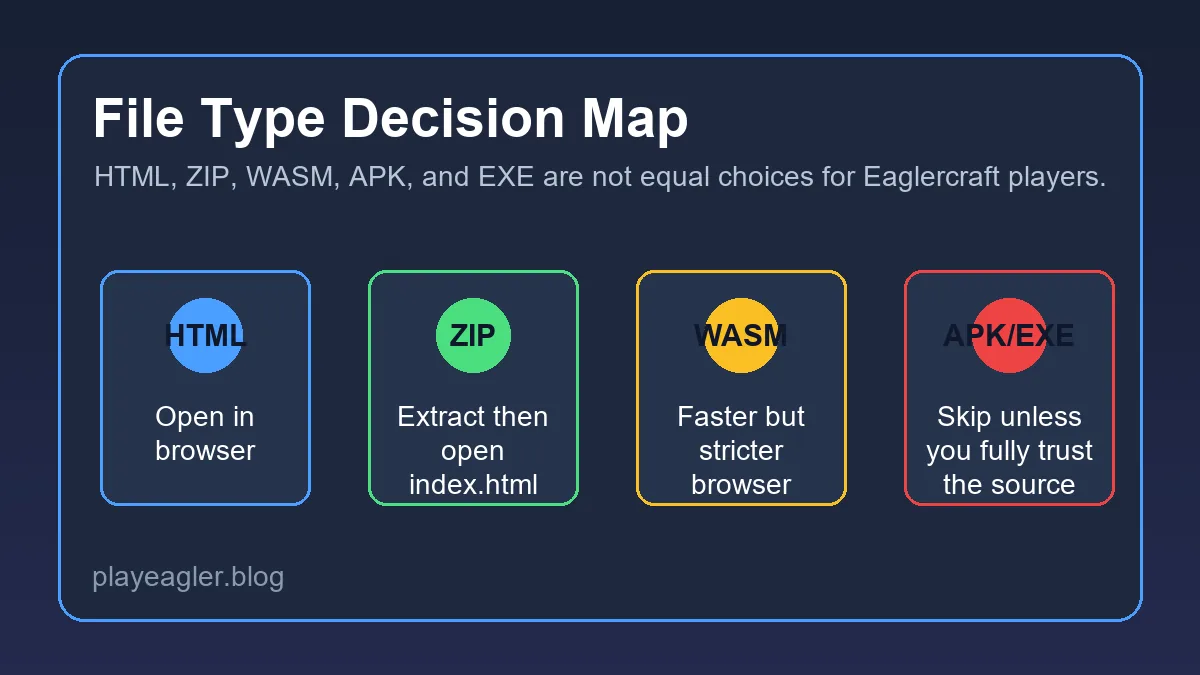
For an official offline ZIP, download it from the project page, keep the archive intact until it finishes, extract it into a clearly named folder, and look for the documented HTML entry file. Open that file in a browser only when the source explains the offline flow. Do not double-click an EXE or install an extension because a third-party page says it is needed to unlock 1.12.2.
Server, Version, and Chromebook Compatibility
A working launcher does not guarantee that every Eaglercraft server will accept the client. Match the client version first. A server advertising 1.8.8 may not accept a 1.12.2 client, and a normal Java IP is not automatically a browser-ready endpoint. Browser multiplayer often needs a compatible WebSocket or WSS route, plus the server-side bridge and account rules that belong to that ecosystem.
Before changing launchers, write down the exact client label, browser, server address, and error message. If singleplayer reaches a world but multiplayer fails, the browser runtime is probably working and the next checks belong to the server address, online status, protocol bridge, or version match. If the menu never opens, fix the browser or client path first.

How to Check Launcher and Download Safety
Start with provenance. A useful launcher page names the project, links to source or an official download page, identifies the version, describes whether the build is stable or experimental, and tells you how to open the file. A weak page hides behind several redirects, uses a large generic Download button, claims impossible FPS, or mixes a browser game with an unrelated installer.
Then check the file itself. HTML, JavaScript, WASM, and ZIP are not interchangeable labels, and an archive may contain more than one client path. Read the folder contents before opening anything, keep a copy of the original archive, and do not disable browser security to make an unknown package run. A file being popular in a video or forum post is not the same as an official verification.
Troubleshooting an Eaglercraft 1.12.2 Client
If the page shows a black screen, wait through one complete first load, refresh once, and test a current browser. Check that JavaScript and WebAssembly are enabled, close heavy tabs, and temporarily compare the JS and WASM-GC choices from the same trusted source. Do not solve a loading problem by jumping to an unknown launcher that asks for an installer.
If the menu opens but a world crashes, lower render distance, start a new singleplayer world, and watch memory use. A new version build can be more demanding than the 1.8.8 route. If a fresh world works but an imported world fails, the issue may be version or world compatibility rather than the launcher itself.
Need a stable browser starting point?
Use the main play page when you want a quick browser session and do not specifically need 1.12.2.
Play EaglercraftWant the version overview?
Read the broader 1.12.2 guide for feature expectations, browser limits, and version boundaries.
Read 1.12.2 GuideNeed server help?
Use the server guide for WSS addresses, multiplayer setup, account commands, and connection checks.
Read Server GuideFrequently Asked Questions
References and Further Reading
- Official Eaglercraft website - Project background and browser-first source links
- Official Eaglercraft Downloads - Checked September 14, 2026 for 1.12.2 JS and WASM-GC offline options
- Community Eaglercraft 1.12.2 repository - Community evidence; read its incomplete and non-official status carefully
- Eaglercraft 1.12.2 Version Guide - Related version, browser, server, and limit overview
About the Author
Sophie Hartwell
Sophie writes practical browser-gaming guides about version choice, client compatibility, multiplayer setup, and safe web play. For this article she compared the official 1.12.2 download paths with the site inventory and community source warnings.
Last reviewed: September 14, 2026 - Focus: Eaglercraft launcher and offline-client compatibility
Choose a Launcher Path You Can Verify
Check the official 1.12.2 download page first, compare JS and WASM-GC on your device, and keep the stable browser guide nearby when an experimental build is not the right fit.